There is a moment that happens to almost every remote worker eventually. You are typing away on the flat, mushy keyboard that came with your laptop dock or that you grabbed from a bin years ago, and something just feels wrong. Your fingers are working harder than they should. Every keystroke feels vague and imprecise. After six hours of typing, your wrists are quietly complaining.
That is the moment people start looking at mechanical keyboards. And once you use a good one, it is genuinely hard to go back.
This guide covers the best mechanical and high-performance keyboards available in Canada right now, organized by budget and use case, with honest notes on who each one is best for.
Mechanical vs Membrane: What Actually Matters
Most standard keyboards use membrane switches, where pressing a key compresses a rubber dome beneath it to complete a circuit. They are quiet, cheap to produce, and get the job done. But the feedback is mushy and imprecise, especially over long typing sessions.
Mechanical keyboards use individual switches under each key. Each switch has a defined actuation point, a consistent travel distance, and physical feedback when the key registers. The result is faster, more accurate typing with significantly less finger fatigue over long sessions.
The catch is noise. Traditional mechanical switches like Cherry MX Blues are loud enough to annoy everyone in the room and everyone on your calls. Modern mechanical keyboards have addressed this with silent tactile switches that deliver the feel of a mechanical keyboard with noise levels comparable to or quieter than membrane options.
The other distinction worth understanding is low-profile versus full-profile switches. Low-profile switches have shallower key travel, similar in feel to a laptop keyboard but with mechanical precision. They are the right choice for anyone coming from a laptop keyboard who wants a mechanical upgrade without the dramatic change in typing feel.
Our Top Picks
Best Budget Pick Under $100 — Keychron K2 V2
Price: approximately $75 to $95 CAD on Amazon.ca
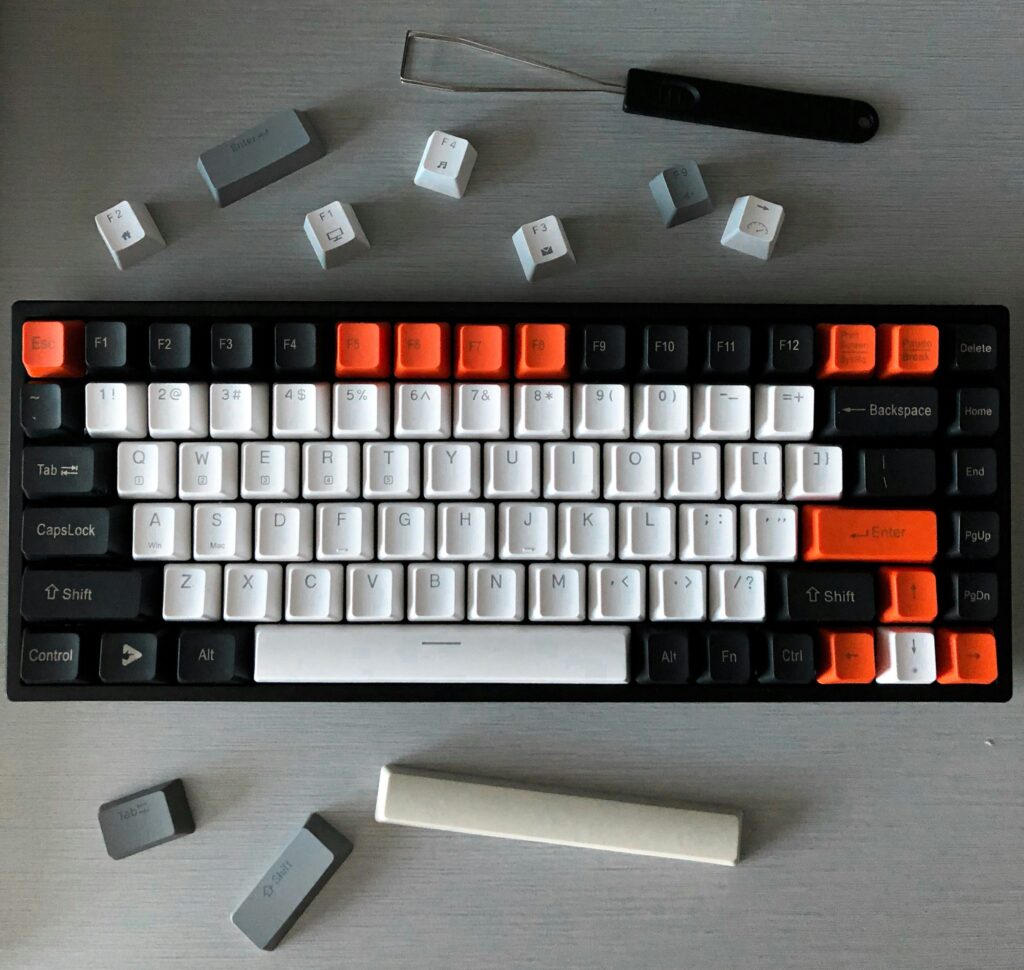
The Keychron K2 is where most people start their mechanical keyboard journey and for good reason. It is a 75-percent layout keyboard, meaning it includes the main typing area, function row, and arrow keys without a numpad, keeping it compact for desk setups. Bluetooth connectivity lets you pair with up to three devices wirelessly, and it comes with keycaps for both Mac and Windows layouts.
The Brown switch version is the best choice for home office use. It provides tactile feedback without the loud click of Blue switches, making it pleasant to type on during calls without disturbing anyone. Build quality is noticeably better than any membrane keyboard at this price and it will last years of daily use.
What we like: compact 75-percent layout, multi-device Bluetooth, Mac and Windows compatible, solid build quality, excellent value.
What to know: not hot-swappable on the base model, ABS keycaps rather than the more durable PBT, charging via Micro-USB rather than USB-C on older versions.
Best Mid Range Pick Under $150 — Keychron K2 Pro
Price: approximately $120 to $145 CAD on Amazon.ca
The K2 Pro is the upgraded version of the K2 with several meaningful improvements. Hot-swappable switches mean you can change the switch type without soldering if you ever want to experiment. The sound-absorbing foam underneath the PCB noticeably dampens typing noise, making it one of the quieter mechanical keyboards available at this price. QMK and VIA support let you remap every key through software if customization matters to you.
It ships with PBT keycaps rather than ABS, which are more durable, resist shine from finger oils better, and feel slightly more premium under your fingertips. USB-C connectivity rather than Micro-USB is a welcome improvement. If you are ready to spend a bit more for a meaningfully better keyboard, the K2 Pro is the right step up.
What we like: hot-swappable, sound-absorbing foam, PBT keycaps, QMK support, USB-C, noticeably quieter than the base K2.
What to know: slightly heavier than the base model, QMK customization has a learning curve if you want to use it.
Best Premium Pick Under $200 — Logitech MX Mechanical Mini
Price: approximately $160 to $180 CAD on Amazon.ca
The MX Mechanical Mini is Logitech’s take on a mechanical keyboard for productivity-focused users, and it is excellent at what it does. Low-profile Kailh Choc V2 switches give it a feel very similar to a premium laptop keyboard but with genuine mechanical feedback. If you are already using an MX Master mouse, the Logi Options+ software ties both devices together with app-specific profiles, customizable shortcuts, and Flow cross-computer control that lets you type on multiple computers with one keyboard and mouse.
Smart backlighting turns on when your hands approach the keyboard and adjusts automatically to ambient light, extending the already impressive battery life to up to 15 days on a single charge with backlighting on. It pairs with up to three devices via Bluetooth or the included Logi Bolt USB receiver.
What we like: low-profile feel great for laptop-to-mechanical transitions, seamless Logitech ecosystem integration, smart backlighting, multi-device connectivity.
What to know: not hot-swappable, locked into Kailh Choc V2 switches, plastic build feels less premium than aluminum alternatives at this price.
Which Switch Type Should You Choose?
This is the question that trips most people up when buying their first mechanical keyboard.
Brown switches are the best starting point for home office use. They have a tactile bump when the key actuates so you know when the keystroke registered, but no audible click. Quiet enough for calls, satisfying enough to type on all day.
Red switches are linear with no tactile bump and no click. Smooth, fast, and very quiet. Good if you type lightly and want minimal resistance.
Blue switches have both a tactile bump and an audible click. Satisfying to type on but genuinely loud. Not recommended for home office environments where others can hear you or where your microphone will pick up the noise.
Silent switches like Boba U4 or Gateron Silent Brown deliver a tactile feel with noise levels lower than most membrane keyboards. If quiet mechanical typing is the priority, these are the right choice.
Do You Actually Need a Mechanical Keyboard?
If you type for more than four hours a day, the answer is almost certainly yes. The difference in finger fatigue at the end of a long writing day between a good mechanical keyboard and a standard membrane option is real and noticeable within the first week.
If you type occasionally and spend most of your computer time in meetings or on calls, a standard wireless keyboard does the job fine. The Logitech MX Keys S remains an excellent membrane option for people who want a premium typing experience without going fully mechanical.
Where to Buy Mechanical Keyboards in Canada
Amazon.ca carries Keychron through the official Keychron Canada store and the full Logitech lineup. Keychron also sells direct at keychron.com with shipping to Canada. Best Buy Canada carries Logitech keyboards in store and online.
Final Thoughts
The Keychron K2 Pro is the best starting point for most Canadian home office workers who want to try mechanical keyboards without overspending. If you are already in the Logitech ecosystem and want seamless integration with your existing devices, the MX Mechanical Mini is worth the premium. And if budget is the primary concern, the base K2 delivers a genuine mechanical experience for under $100 CAD that most people are genuinely surprised by.
Have questions about switch types or which keyboard fits your specific setup? Drop a comment below.
Disclosure: This article contains affiliate links. If you purchase through these links we may earn a small commission at no extra cost to you. This never influences our recommendations.